
Header Email Templates


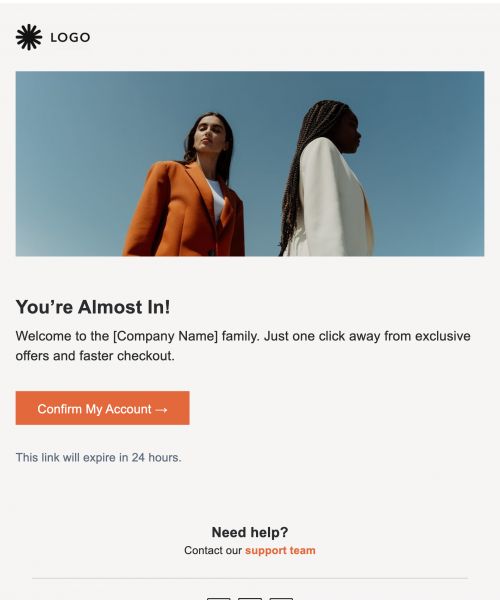


Why Header Emails Matter
The header is one of the most influential parts of any email.
- Brand Recognition: The header reinforces your identity before the content is even read.
- Clarity: It sets the purpose and context for the entire email instantly.
- Visual Impact: A strong header helps determine whether people continue reading.
- Structure: It provides a predictable, professional framework for the email.
- Professionalism: A polished header increases credibility and trust.
You can see why a thoughtful header dramatically improves engagement and ensures your message gets taken seriously.
Problems With Creating Headers Manually
Trying to build a clean, consistent email header without a dedicated tool is often frustrating. Here's what teams run into:
- Inconsistent Formatting: Different team members often build mismatched headers across communications.
- Design Limitations: Standard email clients, like Gmail and Outlook, restrict modern layouts and visual design.
- Duplicated Effort: Rebuilding the same header repeatedly wastes time.
- Brand Drift: Incorrect colors, logos, or styles can easily creep into team emails.
- Image Issues: Hero images frequently distort or break across various email clients.
This section should lead you to realize that a template-based system solves most of these frustrations.
Benefits of Using Header Email Templates
Using templates offers natural advantages over manual header creation. They don't just save you time; they dramatically improve the quality of your communication.
- Consistency: Templates ensure all emails follow a unified brand structure.
- Time-Efficiency: They remove repetitive header-building tasks.
- Professionalism: Templates create strong first impressions with polished visuals.
- Clarity: A template immediately signals the message’s purpose.
- Team Alignment: Templates keep branding cohesive across departments.
Features For Building Header Emails
Publicate provides specialized tools and features that make building professional email headers fast, reliable, and fully on-brand.
Professionally Designed Header Modules
Publicate includes a library of beautifully designed header ideas and modules. This means you get ready-to-customize sections like logos, hero areas, title bars, and multi-column layouts - instantly.
- Drag-And-Drop Speed: Anyone can create a polished header in seconds.
- Built-In Design Quality: Templates crafted by designers ensure a premium aesthetic.
- No Design Skills Needed: Even non-designers can produce high-quality results.
Brand Kit for Automatic Styling
Manual formatting is slow and prone to error. Publicate's Brand Kit automatically applies your organization’s fonts, colors, logos, and styles. This ensures perfect branding every time.
- On-Brand Styling: All headers use the correct brand elements automatically.
- Error Prevention: This eliminates incorrect colors or outdated logos.
- Team-Wide Scalability: Multiple team members can produce identical, professional results.
Inline Image Cropping & Editing
Hero images are a major source of design frustration. They often break layouts or look stretched. Publicate lets users crop, resize, and align hero images directly inside the editor. This ensures clean header visuals across all devices.
- Perfect Alignment: This prevents broken or distorted hero images.
- No External Tools: You don't need to use Photoshop or Canva.
- Mobile-Safe Visuals: Headers stay clean and professional on small screens.
Saved Modules
If you send recurring communications, like a weekly newsletter, you need to use the same header consistently. You can save any header design and reuse it instantly across future templates. This is perfect for recurring newsletters or updates.
- Rapid Reuse: Insert the same header into new emails instantly.
- Full Consistency: Ensure identical branding across all your communications.
- Reduces Rebuild Time: It eliminates repetitive design work.
Compatibility With Gmail, Outlook, Slack & More
A header needs to work everywhere. Headers built in Publicate render correctly across over 57 email clients and communication channels.
- Stable Layouts: Headers hold their shape across all email clients.
- No Formatting Issues: This prevents distortions common in corporate email systems.
- Internal Comms Ready: It’s built specifically to handle Outlook’s strict rendering.
Publicate guarantees dependable formatting across the tools enterprises rely on.
Best Practices for Effective Email Headers
Here’s strategic guidance to help you make the most of any header template you choose.
- Use A Clear Visual Hierarchy: Ensure your brand, title, and subtext appear in a logical order.
- Keep The Purpose Obvious: Titles should clearly define what the email is about.
- Maintain Brand Consistency: Always use correct colors, fonts, and approved branding elements.
- Write Concise Titles: Keep header titles short and to the point.
- Prioritize Mobile Readability: Ensure headers scale properly on smaller screens.
- Optimize Image Sizes: Large hero images slow load times and can break formatting.
These best practices ensure your headers are not only visually appealing but also strategic and effective.
When To Use Header Email Templates
Header templates offer the most value when recognition and professionalism are key.
- Internal Newsletters: Create recognizable branding for recurring sends.
- HR Announcements: Add authority and clarity to internal messages.
- Project Updates: Label the project name, cycle, or status at a glance.
- Leadership Communications: Increase professionalism and reader trust.
- Event Communications: Distinguish invitations, updates, and recaps visually.
This shows that header templates serve nearly any internal or external communication purpose.
Build Professional First Impressions
Publicate understands the value of making an immediate, professional impression from the first line of an email. Building beautiful, on-brand headers is only one click away. Reinforce your professionalism and brand consistency effortlessly.
Try Publicate today.


.svg)