
Verification Email Templates




Why Verification Emails Matter
A verification email can actually be seen as the handshake between your brand and a new user. It reassures them that their account is safe, confirms their registration went through and sets the tone for the customer experience moving forward.
When handled correctly, these emails do far more than confirm an address. They:
- Protect your platform: Verification keeps out bots and fraudulent accounts.
- Build trust: A polished, branded email reassures users they’re in safe hands.
- Drive activation: A clear call-to-action makes it easy to confirm and start using your service.
- Improve deliverability: Confirmed addresses keep your list healthy, helping future emails land where they should.
- Lower support costs: A simple, smooth process means fewer login or help requests.
This one email lays the foundation for trust, security and long-term engagement.
Key Components of a Verification Email
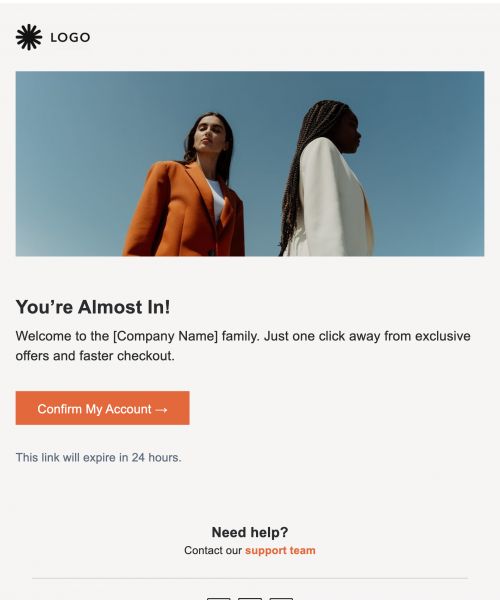
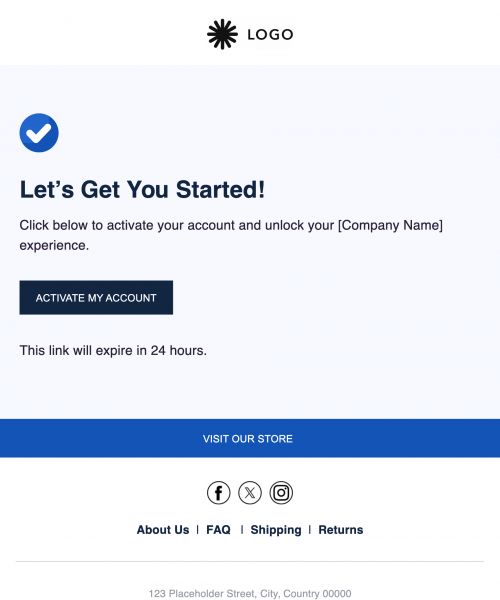
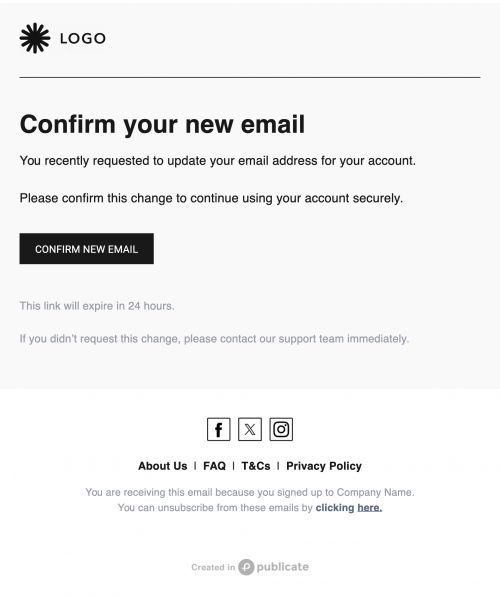
When a user receives a verification email, they want it to be obvious, simple, and safe. Strong templates all follow a familiar structure that helps users immediately recognize what’s required and why. Each element works together to remove doubt, reduce friction and guide the user straight to completion without second-guessing.
- Purpose statement: A short line explaining why they’re receiving the email—for example, "You signed up for [Brand]. Please confirm your email."
- One-click confirmation button: A bold, easy-to-spot button that completes verification instantly.
- Numeric OTP fallback: A one-time code option for users who prefer to enter details manually.
- Link expiry notice: A clear reminder that the link or code will expire, usually within 24 hours.
- Help center link: A contact option if the user didn’t request verification or runs into issues.
These elements create clarity and reassurance which helps users trust the process and complete it without hesitation.
Balancing UX and Security
Verification emails walk a fine line as they must be strong enough to block fraudulent activity while staying simple and user-friendly. Too much complexity can frustrate people, but too little protection leaves your platform vulnerable. The best verification emails strike the perfect balance by presenting only the information that matters while quietly embedding security into the background.
The most effective approaches include:
- Set link lifespans: Expire verification links within 24 hours to prevent misuse.
- Keep content short: Long, cluttered emails look suspicious and can resemble phishing.
- Highlight the button: Use your brand’s main color so users know exactly where to click.
- Offer fallback options: Include a plain-text link and/or OTP code so no one gets stuck.
- Add a visible support line: A small help link builds transparency and confidence.
The easier and safer the process feels, the more likely users are to complete verification straight away.
Features of Publicate’s Verification Templates
Designing verification emails from scratch takes time, and small mistakes can hurt both deliverability and security. Publicate’s features are built to remove that friction, giving you ready-to-use components that are flexible, professional, and tested across devices.
- Merge-tags for unique verification links or OTP codes.
- Accessibility-ready HTML so every user can engage.
- Dark-mode compatible styling for consistent design in any inbox.
- Mobile-friendly button sizing for easy tapping on phones.
- Drag-and-drop modules to quickly build headers, CTAs, and footers.
- Brand kit integration to keep fonts, logos, and colors consistent.
- Inline CSS for smooth rendering across email clients like Gmail and Outlook.
- Analytics to track opens, clicks, and verification completion.
Our business email templates deliver security and speed, while reinforcing your brand at every step.
Best Practices for Verification Emails
Even with the right template, how you send verification emails makes all the difference. Timing, clarity and design choices directly affect whether users complete the process smoothly or run into frustration. Following best practices ensures that your verification emails not only do their job but also leave users with a positive first impression of your brand.
- Use a clear subject line: "Please confirm your email address" works best.
- Send instantly after registration: Timing is critical—strike while the user is engaged.
- Expire links within 24 hours: Adds security and urgency.
- Place the button above the fold: Make sure users see the CTA right away.
- Include a support channel: Give users a fallback if they didn’t sign up or hit a snag.
- Personalize where possible: Adding a name or account detail builds confidence.
- Test on mobile: Many verifications happen on phones, so responsiveness is essential.
Clear, timely and secure emails lead to higher conversions and stronger relationships.
Testimonial
"Our verification emails used to feel cold and technical. Publicate helped us design branded, trustworthy templates that look great on mobile. Completion rates improved, and users say they feel safer with us." – Lena S., Growth Marketing Lead
Conclusion
Verification emails may be short but their importance can’t be overstated. They protect your platform, confirm new accounts and ultimately create the very first impression of your brand’s professionalism. Done right, they’re fast, clear, and reassuring which helps users take that first step with confidence.
With Publicate’s verification email templates, you can create secure, branded, and mobile-ready emails in minutes. Features like merge-tags, dark-mode compatibility, and built-in analytics make it simple to send messages that feel trustworthy and consistent every time.


.svg)