
PTO Email Templates
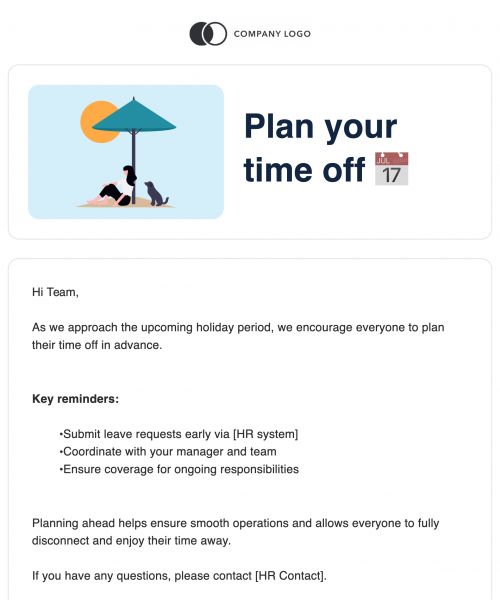


Take the Guesswork Out of PTO Communication
When someone takes time off, their communication shouldn't go offline too. PTO emails help create a transparent, respectful process around time-off requests, approvals, and confirmations.
- Keeps Schedules Aligned: Managers, HR, and teams stay informed.
- Improves Team Coverage: Handovers are smoother and easier to coordinate.
- Provides Documentation: HR teams get reliable records for compliance.
- Maintains Professionalism: Structured communication builds trust and consistency.
- Reduces Miscommunication: Everyone receives the same key details.
A well-crafted PTO email makes the time-off process clear for everyone and helps maintain professionalism at every step.
Challenges With PTO Emails When Written Manually
Despite their importance, PTO emails are often written on the fly, leading to confusion, inconsistency, and extra back-and-forth. Without structure, it’s easy for things to fall through the cracks.
- Missing Key Details: Dates, responsibilities, or contact info often get left out.
- Tone Uncertainty: Striking the right balance between formal and friendly is tricky.
- Inconsistent Formatting: Styles vary across individuals and teams.
- Lack of Structure: Dense, unorganized messages make approvals harder to process.
- Documentation Issues: HR teams lose track of emails that don’t follow a clear format.
Using a standard PTO email template takes the pressure off employees and managers, ensuring important information is always captured and shared professionally.
Benefits of Using PTO Email Templates
Templates are the simplest way to bring structure, clarity, and efficiency to your time-off communication process. They save time, reduce errors, and ensure a consistent experience for everyone involved.
- Clear Structure: Templates prompt users to include all necessary details.
- Professional Tone: Maintain workplace standards without sounding robotic.
- Faster Requests & Approvals: Less editing and rewriting means quicker decisions.
- Easy Tracking: Consistent formatting simplifies recordkeeping for HR.
- Reduced Errors: Avoid missed dates or incomplete information with pre-set fields.
PTO templates support a more respectful, efficient workflow, providing effective employee communication tools to navigate time off clearly and confidently.
Why Build PTO Emails in Publicate
Publicate isn’t just a design tool - it’s a communication enhancer that makes PTO messaging more structured, branded, and HR-friendly.
- Lightweight HR-Friendly Layout Blocks: Use simple, clean content modules designed specifically for HR needs with header ideas like "Requested Dates," "Coverage Plan," "Approval Confirmation," and "Next Steps". These blocks eliminate clutter and make each email easy to skim and understand, no matter who’s reading it.
- Customizable Header Options: Visually differentiate between email types like a PTO request, an HR confirmation, or a manager’s approval using styled headers. This ensures that recipients can recognize the purpose of the message at a glance, which is especially helpful for busy inboxes and approval chains.
- Reusable Request and Approval Modules: Save time by creating a library of frequently used paragraphs and phrases. Whether it’s a standard PTO request introduction, a manager’s approval response, or a legal disclaimer from HR, these modules can be dropped into emails instantly for faster turnaround and consistency across your team.
- Signature-Ready Modules: Include pre-formatted employee and manager signature blocks that automatically include names, roles, and contact information. These ensure all PTO emails close on a professional note, which is especially important when messages are reviewed by HR or legal teams.
- On-Brand Color Accents for Internal Messaging: Add subtle, company-approved color accents to headings, dividers, or sections. This keeps PTO communication visually aligned with your internal branding, creating consistency across departments without making internal emails feel overly styled or promotional.
- Structured Micro-Sections for Key Details: Break up content using labeled mini-blocks like "Dates Requested," "Work Coverage," or "Contact During Leave". These sections help avoid walls of text and make it easier for managers or HR reps to find the most relevant information at a glance.
- Optimized Readability for Mobile Devices: Many PTO requests or approvals are reviewed on mobile, especially by managers on the move. Publicate’s responsive layouts ensure all templates render perfectly across devices, so nothing gets missed due to poor formatting or broken layouts.
With Publicate’s features, creating PTO emails becomes faster, clearer, and more aligned with your organization’s communication standards.
Best Practices for PTO Emails
Following a few simple communication best practices makes PTO emails smoother for both senders and recipients, and helps your team avoid confusion.
- Provide Exact Dates: Always include both the start and end date.
- Share a Coverage Plan: Let your manager know who will cover your tasks.
- Give Advance Notice: More time = easier scheduling and fewer disruptions.
- Use a Professional Tone: Friendly, concise, and respectful works best.
- Confirm Contact Details: Will you be reachable? Be clear about your availability.
- Document Approvals: Keep a written record for clarity and compliance.
- Follow Company Protocols: Use proper subject lines, CCs, and distribution lists.
These habits make PTO communication faster to process and easier for HR to manage.
Standard PTO Email Structure
Here’s the structure we recommend for every type of PTO message, whether you’re requesting, approving, or confirming.
- Clear Subject Line: Examples include "PTO Request," "Time Off Approval," or "Vacation Confirmation".
- Professional Greeting: Address your manager, HR rep, or team lead directly and respectfully.
- Request Statement: Include the specific dates of your time off, front and center.
- Optional Reason: Offer a brief explanation if required, without oversharing.
- Coverage Plan: Note what tasks will be covered and by whom.
- Availability Details: Clarify whether you’ll be reachable or completely offline.
- Request for Confirmation: Politely ask for approval or next steps.
- Professional Sign-Off: Close with your name, role, and contact details.
Following this structure helps you write more confidently and ensures every email is complete, respectful, and easy to respond to.
Create Clear, Professional PTO Emails in Minutes
Your time-off communication shouldn’t be a time-consuming task. With Publicate’s pre-built modules, styling controls, and reusable layouts, it’s easy to build professional PTO emails that reflect your team’s standards. Create professional PTO emails with structured templates, consistent formatting, and HR-ready layouts for requests, approvals, and updates, all easily built in Publicate.
Let your communication work as smoothly as your PTO plans. Try Publicate today


.svg)