In our April 2025 edition of Online Campus News You Can Use, we advise you of important tool updates, tasks, and upcoming events to help faculty deliver high quality online instruction.
Hot Topics
Career Essentials Assessment Setup Tips
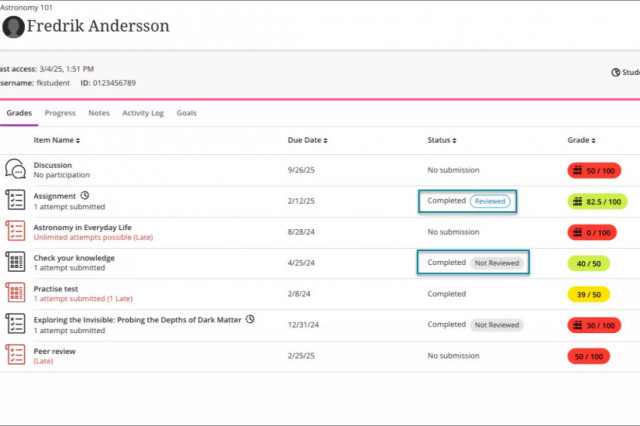
Carefully review the Instructions for Setting Up a Career Essentials Assessment.
- Use a 2024 rubric in your Spring courses; related goals have not changed.
- Align a goal to the assessment; this is what sends the score to our reporting!
- Set the points possible to a value greater than 0 for accurate scoring!
- Edit the Overall Grade if you want to exclude it from final grade calculations.
For additional information, see the Career Essentials FAQ.

Class for Web Collaborate Maintenance Coming June 2nd
Recordings of Class for Web virtual meetings created before December 1, 2024 will be deleted from the Collaborate server on June 2, 8:00 AM CDT. This is necessary to maintain the tool's availability. Recordings are automatically backed up to your YuJa media library through the Collaborate Connector. To preserve recordings that are not already in your YuJa library, transfer them to YuJa before June 2, 2025. If you need assistance, refer to our walk-through instructions and demonstration videos.
AI Literacy Essentials For Students Micro-Credential
AI Literacy Essentials For Students: A Micro-Credential For Maximum Impact is a comprehensive six-part micro-credential series designed to equip college students with a fundamental understanding and practical knowledge of Artificial Intelligence (AI). This program covers everything from basic concepts and ethical considerations to the application of AI tools in academic and professional settings. Each 15-minute session is tailored to enhance students' AI literacy, preparing you for both academic success and future career challenges. Available through our Online Orientation's Student Success Workshops page.
Upcoming Special Events

Faculty Liaison Support Drop-in Support Sessions
Join our drop-in sessions to learn from our faculty experts about online teaching and Blackboard tools. See our schedule for April Dates! If you are new to using Blackboard, review our Ultra Semester Success ToolKit prior to attending a session.
Anthology's Blackboard Modernization Webinars
Join experts from Anthology to discuss key topics in designing high-impact courses. Click the links to register for free upcoming sessions available April through June!
- Blackboard Essentials for Instructors: Exploring Course Structure and Content
- Blackboard Assessments Simplified: Training for Instructors
- Streamlined Grading in Blackboard: Best Practices for Educators
- Navigating Blackboard Gradebook: Tips for Instructors and Course Builders
- Smart Course Creation: Leveraging AI Design Assistant in Blackboard
- Inclusive Design in Action: Maximizing Accessibility in Blackboard
Anthology's Innovative Educator Series
Join educators from around the globe in this dynamic webinar series designed to transform the way you teach, engage, and inspire. Revolutionize your teaching with cutting-edge strategies and technologies. With each session, you’ll gain practical tools to enhance inclusivity, harness the power of AI for personalized learning, and captivate students in online and hybrid environments. Click here to register.

Training for Teaching Online in Summer 2025
To teach online, blended, virtual, hybrid, or hyflex courses, instructors must complete Introduction to Blackboard Ultra (ZERD-190), Online Instructional Quality (ZERD-219), and meet the 21st Century Classroom Level 2 standards. See our Summer & Fall 2025 Training Schedule. Open Registration for Summer 2025 in Self-Service begins April 22, 2025. Watch our demonstration video to learn how to register. For help, email register@matc.edu.
Ultra Support
Faculty Resources
The Center for Teaching Excellence provides one on one faculty Blackboard Ultra support. Contact your faculty development coach or cte@matc.edu. The Online Learning faculty liaisons are available by appointment to consult regarding high quality online instruction. For high-level troubleshooting of errors or activity that requires investigation, Contact the Online Campus. A Blackboard administrator will be in contact with you.
For self-directed or just-in-time training on Blackboard Ultra and other tools, see the following resources on the Ultra Faculty Support website:
Student Resources - Share with Your Students!
See our Staff Resources Guide to Blackboard Ultra to review the training and support options we provide to students. In addition to options for live and self-paced online learning orientations, students can access support through the Student Online Learning Support Site.
Share our self-paced Online Readiness module and live orientation webinar schedule with your students to help them learn about the tools, tasks, and strategies to start their studies strong. If you share the Online Readiness module as a link in your course, use this specific URL: https://www.go2orientation.com/learn/course/matc-online-readiness?client=matc. This will take the student to an MATC login page where the student will log in with their MATC network account!
Log into the Online Orientation with an MATC network account to access a self-paced overview of the tools and processes successful online students use in their classes.
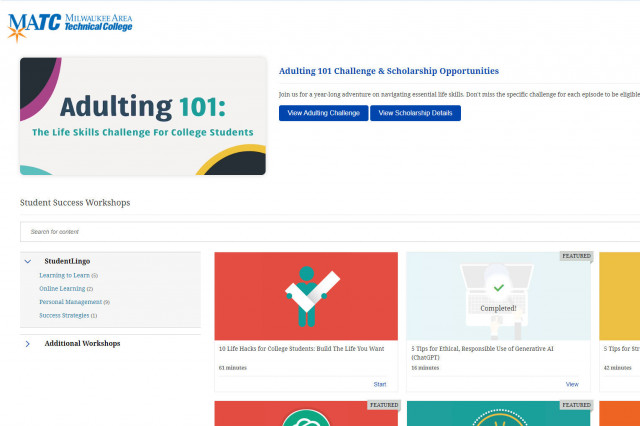
When logged into the Online Orientation, click on the Student Success Workshops link for on-demand training on generative AI, study skills, life skills, and more!

RSVP to join a Google Meet session lead by experts in the Online Campus. These sessions are perfect for viewing a live demonstration of Blackboard navigation and asking questions.