In our February 2025 edition of Online Campus News You Can Use, we advise you of important tool updates, tasks, and upcoming events to help faculty deliver high quality online instruction.
Hot Topics
AI Design Assistant Tools
Discover Blackboard Ultra's AI Design Assistant to simplify and streamline your course design. With these tools, you can generate images, test questions, rubrics, and more. See our video playlist to learn more about these tools.
At this time, Anthology does not support AI writing detection tools because research shows they often produce false results, particularly affecting English language learners and minorities. See Anthology's whitepaper AI, Academic Integrity, and Authentic Assessment: An Ethical Path Forward for Education.
Upcoming Special Events

YUJA Video Platform - Faculty Training Sessions
Join us in Zoom to learn about using the YuJa Video Platform in your teaching practice. You will see live demonstrations and have opportunities to ask YuJa experts questions.
- Faculty Training Part I: Creating, Captioning, and Sharing Videos
Friday February 7 at 9 AM - 10 AM CST
Join through Zoom - See these instructions - Faculty Training Part II: Advanced Features - Quizzing and Video Editing
Friday February 21 at 9 AM - 10 AM CST
Join through Zoom - See these instructions

Anthology's Innovative Educator Series
Join educators from around the globe in this dynamic three webinar series.
- The One Where AI Transforms Teaching
Friday February 7th at 11 AM CST
Sign Up Here
Blackboard Ultra Support Drop-in Workshops
Have questions about Blackboard, Regular & Substantive Interaction, or online teaching? Join Online Learning's faculty liaisons at our drop-in workshops for expert guidance and hands-on training. Explore the Spring 2025 Drop-in Workshop Schedule for topics, dates, and times!
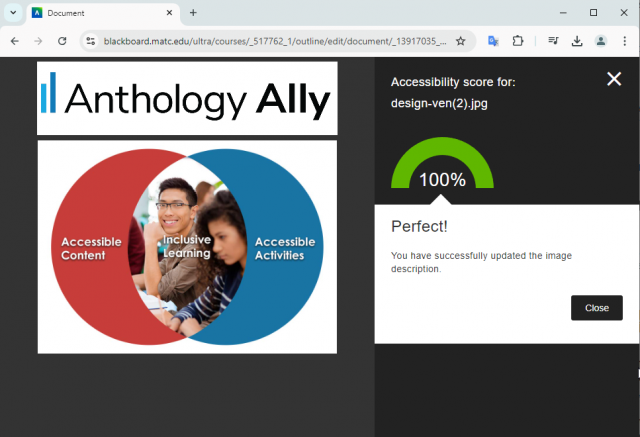
Ally Workshop Spring 2025 Schedule
The accessibility of course materials has a direct impact on a student’s learning experience, sense of inclusion, and ultimate success. In collaboration with MATC's Center for Teaching Excellence, we are pleased to announce our Ally Workshop Schedule for Spring 2025. See the schedule for dates and registration links.
In these virtual and in-person sessions, you will learn how Ally benefits students, practice using Ally to address common file accessibility barriers, and explore Alternative File Download formats, such as speech-to-text MP3 audio, and text translation to over 71 languages.
In these virtual and in-person sessions, you will learn how Ally benefits students, practice using Ally to address common file accessibility barriers, and explore Alternative File Download formats, such as speech-to-text MP3 audio, and text translation to over 71 languages.

Training for Teaching Online
The Faculty Appendix will soon contain language that requires new instructors expecting to teach online, blended, virtual, hybrid, or hyflex courses to complete ZERD-190 and ZERD-219 as well as demonstrate the 21st Century Classroom Level 2 standards. See our Spring 2025 Training Course Schedule for a full list of our offerings.
Ultra Support
Faculty Resources
The Center for Teaching Excellence provides one on one faculty Blackboard Ultra support. Contact your faculty development coach or cte@matc.edu. The Online Learning faculty liaisons are available by appointment to consult regarding high quality online instruction. For high-level troubleshooting of errors or activity that requires investigation, Contact the Online Campus. A Blackboard administrator will be in contact with you.
For self-directed or just-in-time training on Blackboard Ultra and other tools, see the following resources on the Ultra Faculty Support website:
Student Resources - Share with Your Students!
See our Staff Resources Guide to Blackboard Ultra to review the training and support options we provide to students. In addition to options for live and self-paced online learning orientations, students can access support through the Student Online Learning Support Site.
Share our self-paced Online Readiness module and live orientation webinar schedule with your students to help them learn about the tools, tasks, and strategies to start their studies strong. If you share the Online Readiness module as a link in your course, use this specific URL: https://www.go2orientation.com/learn/course/matc-online-readiness?client=matc. This will take the student to an MATC login page where the student will log in with their MATC network account!
Log into the Online Orientation with an MATC network account to access a self-paced overview of the tools and processes successful online students use in their classes.
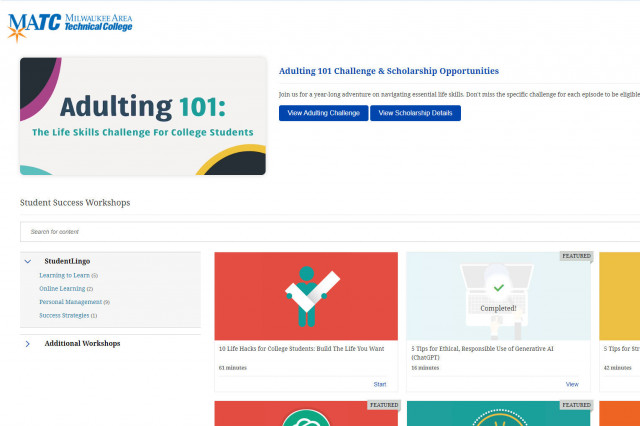
When logged into the Online Orientation, click on the Student Success Workshops link for on-demand training on generative AI, study skills, life skills, and more!

RSVP to join a Google Meet session lead by experts in the Online Campus. These sessions are perfect for viewing a live demonstration of Blackboard navigation and asking questions.